SMS Delivery Report (DLR)
Delivered, Sent, Undelivered — what each status means for your SMS campaign.
The Journey of Your SMS
A delivery report tells you how far your message travelled. This is the path every SMS takes, and the point at which reporting stops in Malaysia.
Compare with WhatsApp Business API delivery tracking →
What is an SMS DLR?
When you send SMS via the iSMS web portal or API, our server submits the message to the mobile operator's SMSC (Short Message Service Centre). The SMSC then returns a delivery notification status to iSMS.
DLR (Delivery Report) is different from DN (Delivery Note). A DN is the initial receipt from the Telco confirming that the SMSC accepted the message. The DLR goes further — it tells you the final delivery outcome.
DLR is available when using 2-Way SMS or random/long number SMS. It is not available for custom Sender ID messages in Malaysia, as Telcos do not return delivery receipts for those routes.
DLR Status Codes
| Status | Description |
|---|---|
| SENT |
SMS submitted to Telco SMSC — no delivery notification returned.
|
| DELIVERED |
Message delivered to Telco SMSC with a successful delivery status.
|
| UNDELIVERED |
Message delivered to SMSC but returned a failed delivery status.
|
| PENDING | Message accepted by iSMS server and queued for submission to the mobile operator. Processing in progress. |
| FAIL | Message rejected at the carrier SMSC — the destination network was unavailable or blocked. Failed SMS are not charged. |
Where to Find Your Delivery Report
Open it from SMS → SMS DLR Report in the member portal and filter by date. The cards at the top show your totals and delivery rate; the charts below split your messages by status, both by count and by percentage.
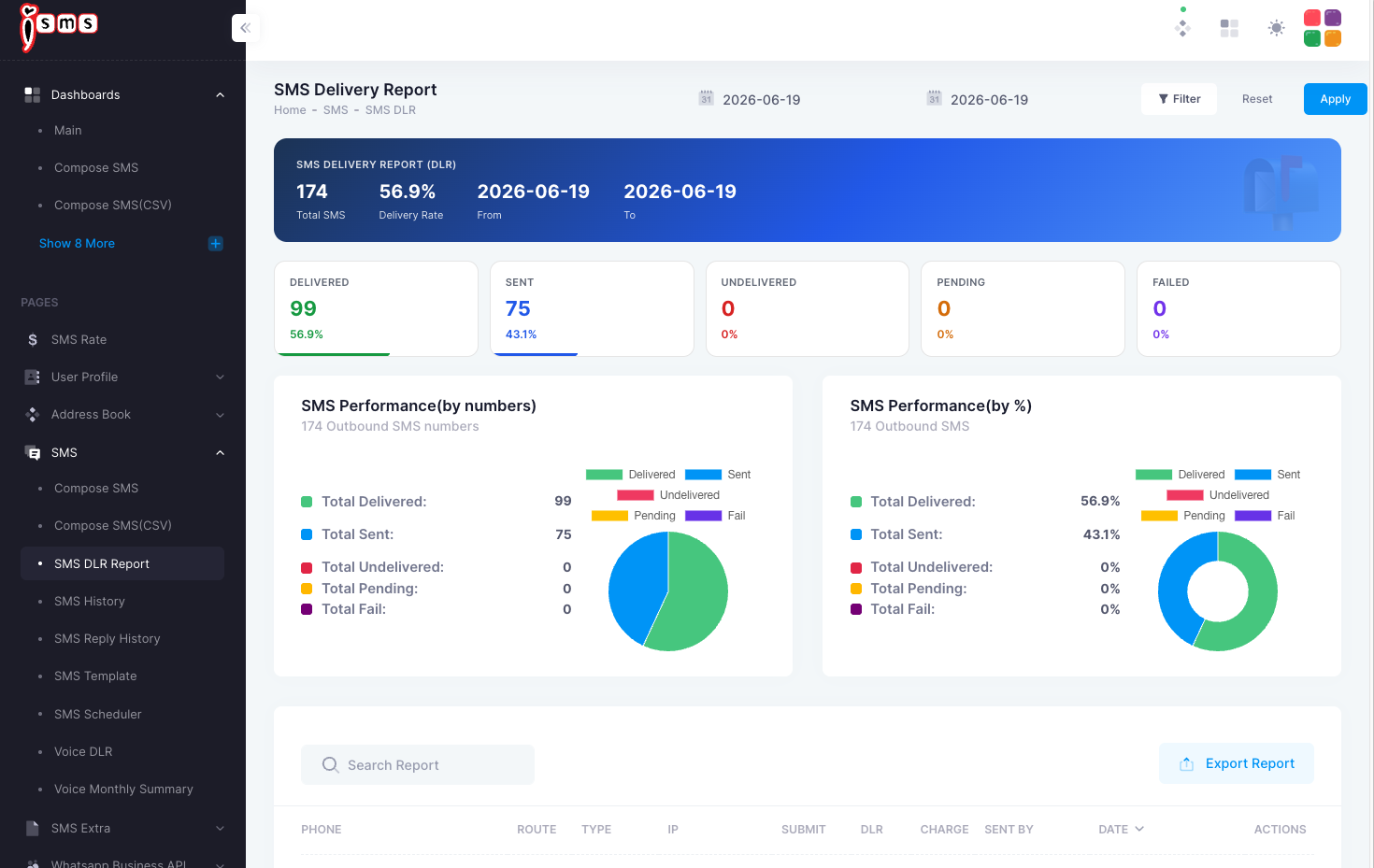
For a full walkthrough of the report screen, see the End User Guide chapter on the DLR report →
📞 Contact iSMS Support
💬 WhatsApp +6016 450 2380 · 📞 1800 87 7061 · KL +603 2780 3880 · PG +604 2024 033 · [email protected]
Please include your iSMS username in any support email.